

Key takeaways
- Most major AI model providers now offer a billing or usage API - but the depth, granularity, and programmatic accessibility vary significantly. Knowing what is available from each provider before building cost pipelines saves considerable re-work.
- Hyperscaler AI workloads (AWS Bedrock, Azure OpenAI, Google Vertex) benefit from the same billing infrastructure as other cloud spend, making them the easiest to integrate into existing FinOps tooling.
- AI coding tools - GitHub Copilot, Amazon Q Developer, JetBrains AI - are increasingly material enterprise costs but are frequently purchased outside the AI cost governance remit. Programmatic access to their billing data is patchy and should be validated before assuming automation is possible.
- The practical gap in most AI cost pipelines is not the API access itself - it is mapping provider-level cost data to business context (team, product, workflow, outcome). That mapping problem requires organisational decisions, not just technical integration.
- Billing APIs expose headline costs but often miss the mechanics that drive real spend. A May 2026 analysis by Inferbase, a commercial inference-routing vendor, gives a worked example in which an agent forecast at about $9,000 a month on headline rates ended nearer $14,000. It attributes the gap to caching, output ratios, rate-limit tiers and side-charges that standard billing APIs do not always surface clearly.
Last verified
Each provider's billing and usage interface was checked against its published documentation where that could be read on 6 October 2026. Where a page could not be read, the entry is marked and the content below is as previously published.
| Provider | Last verified | Result |
|---|---|---|
| Anthropic | 6 October 2026 | Checked against the Usage and Cost Admin API documentation. Endpoint corrected |
| GitHub Copilot | 6 October 2026 | Billing endpoint confirmed. Usage endpoint replaced by usage metrics endpoints. Corrected |
| Cursor | 6 October 2026 | Admin API with usage and spending endpoints found in its documentation. Previous statement corrected |
| OpenAI | Not re-verified | Documentation not readable in this review. Example request revised to use Unix time parameters |
| Google Vertex AI and Gemini | Not re-verified | Cloud Billing export approach unchanged in principle |
| AWS Bedrock and Amazon Q Developer | Not re-verified | Cost Explorer approach unchanged in principle |
| Azure OpenAI | Not re-verified | Azure Cost Management approach unchanged in principle |
| Devin Desktop (formerly Windsurf) and JetBrains AI | Not re-verified |
Why programmatic billing access matters
Manual AI cost review - logging into provider consoles, exporting CSVs, reconciling spreadsheets across providers - does not scale once an AI estate has more than a handful of tools and services. The FinOps practices that work well for cloud infrastructure - automated cost aggregation, real-time anomaly detection, allocation by team or product, chargeback reporting - require programmatic access to billing data. Interpretation For AI specifically, programmatic access serves four functions. InterpretationAutomation and reporting cadence. Pulling cost data on a scheduled basis allows FinOps teams to maintain current reporting without manual refresh cycles. For AI, where inference demand can shift quickly, daily or even intra-day cost visibility is preferable to weekly or monthly export cycles. Interpretation
Anomaly detection. Unexpected spikes in AI cost - a workflow with a logic error generating excessive token consumption, a new deployment that ran at much higher volume than expected - are most actionable when detected quickly. Programmatic access enables the alerts that make fast response possible. Interpretation
Business context mapping. Raw provider cost data shows spend by model, by project, or by API key. Business context - which product, which team, which initiative, which business unit - requires enrichment that is only feasible when the cost data is available as structured data in a system that can join it to organisational metadata. Interpretation
Portfolio-level reporting. When AI spend is fragmented across OpenAI, Anthropic, AWS Bedrock, Azure OpenAI, GitHub Copilot, and a SaaS AI tool or two, understanding the total AI cost picture requires aggregating data from multiple sources. Programmatic access is a prerequisite for any unified AI cost view. Interpretation
Model providers
OpenAI
What is available: OpenAI offers a Usage API at /v1/usage (deprecated in favour of newer endpoints) and a Costs endpoint through the API dashboard. The primary programmatic path for enterprise billing data is the Costs API (GET /organization/costs) and the Usage API (GET /organization/usage), accessible with an admin API key. Interpretation
Implementation example: A typical daily cost pull from OpenAI's Costs API. Time parameters are Unix timestamps, so check the current reference for parameter names:
curl "https://api.openai.com/v1/organization/costs?start_time=1780272000&bucket_width=1d" \
  -H "Authorization: Bearer $OPENAI_ADMIN_KEY"
Returns JSON with cost breakdowns by project, model, and date. Parse and load into your data warehouse for aggregation with other AI costs.
Allocation support: Costs can be segmented by OpenAI Project, which maps to team or product boundaries if projects are provisioned accordingly. API key tagging provides an additional dimension. The user parameter in API calls allows per-user attribution where supported. Interpretation
Practical note: OpenAI's API versioning means the exact endpoints and response formats should be verified against current documentation. The platform has evolved its billing infrastructure significantly in 2024-2025 and the Admin API is the current recommended path for enterprise programmatic access. Interpretation
Gap: No native webhook support for real-time cost events. Polling the API on a scheduled basis is the standard integration pattern. Interpretation
Anthropic
What is available: Anthropic's Usage and Cost Admin API gives programmatic access to organisation usage and cost. Token usage is available from GET /v1/organizations/usage_report/messages, with filtering and grouping by API key, workspace, model, service tier, context window and data residency, and a separate cost report endpoint for dollar amounts. It measures uncached input, cached input, cache creation and output tokens separately. Interpretation
Allocation support: Anthropic Workspaces provide an organisational boundary for multi-team or multi-product deployment. API keys can be scoped to workspaces, enabling cost attribution at workspace level. The usage report can be filtered and grouped by workspace. Interpretation
Practical note: The Admin API requires an Admin API key or equivalent admin credential, distinct from inference API keys, and is not available for individual accounts. Provision admin access as part of enterprise setup, not as an afterthought. Programmatic usage and cost endpoints are not available for Claude Platform on AWS, where the Console pages are the route. Interpretation
Google (Vertex AI and Gemini API)
Vertex AI (enterprise path): Costs flow through Google Cloud Billing with full support for labels, resource tags, and BigQuery billing export. For organisations with Cloud Billing configured, Vertex AI costs appear in Cost Explorer and can be analysed programmatically through the BigQuery export schema. This is the most mature programmatic billing path for Gemini in an enterprise context. Interpretation
The Cloud Billing API (GET /v1/billingAccounts/{billingAccountId}/subAccounts) and BigQuery export together provide comprehensive programmatic access with arbitrary filtering and aggregation. Interpretation
Implementation example: Query Vertex AI costs from BigQuery billing export:
SELECT
  DATE(usage_start_time) as date,
  service.description as service,
  sku.description as sku,
  SUM(cost) as total_cost
FROM `project.dataset.gcp_billing_export_v1_XXXXXX`
WHERE service.description = 'Vertex AI'
  AND DATE(usage_start_time) >= '2026-06-01'
GROUP BY date, service, sku
ORDER BY date DESC;
This pattern works for any GCP AI service and integrates with existing cloud FinOps workflows.
Gemini Developer API (consumer/developer path): Usage is tied to a Google Cloud project and quota tiers. Cost data is accessible through Cloud Billing rather than a Gemini-specific endpoint. Programmatic access follows the same Cloud Billing API path. Interpretation
Allocation support: Labels on API calls and resource tags in Cloud Billing provide allocation dimensions. The BigQuery export schema includes project, resource, and label fields for join operations. Interpretation
AWS Bedrock
What is available: AWS Bedrock costs flow through AWS Cost Explorer and AWS Billing with full support for cost allocation tags, budgets, and the AWS Cost Explorer API. The GetCostAndUsage API supports filtering by service (bedrock), region, account, and custom tags. Bedrock-specific dimensions include model ID, inference type, and feature (e.g., Guardrails, Knowledge Base retrieval). Interpretation
Allocation support: AWS Cost Allocation Tags can be applied to Bedrock invocations where the calling service supports tag propagation. For Bedrock calls made through application code, the calling infrastructure's tags flow through to billing. This is AWS's standard tagging model, familiar to teams already doing cloud FinOps. Interpretation
Practical note: Tag propagation from Bedrock API calls to Cost Explorer requires that tags are enabled for cost allocation in the AWS Billing console. New tags take 24 hours to appear in cost data after activation. Interpretation
Azure OpenAI
What is available: Azure OpenAI costs flow through Azure Cost Management and are accessible via the Azure Consumption REST API and Cost Management API. The /usageDetails endpoint provides line-item cost data filterable by subscription, resource group, tag, and service (Microsoft.CognitiveServices). Interpretation
Allocation support: Resource tags on Azure OpenAI deployments flow through to cost data. For multi-tenant deployments where a single Azure OpenAI resource serves multiple teams, tag propagation at the call level is limited - cost attribution at sub-resource granularity typically requires application-level instrumentation. Interpretation
Copilot-specific note: Microsoft 365 Copilot costs (the enterprise productivity AI, distinct from Azure OpenAI) appear in Microsoft 365 billing rather than Azure Cost Management. The Microsoft Graph API exposes Copilot usage data (user activity, feature adoption) through the Reports API, but dollar cost data for M365 Copilot requires access through the Microsoft 365 Admin Center or the Partner Center API for resellers. This is a notable gap for FinOps teams accustomed to seeing all AI costs in Azure. Interpretation
AI coding tools
GitHub Copilot
What is available: GitHub provides a Copilot Billing API (GET /orgs/{org}/copilot/billing) that returns seat assignment data, billing cycle information, and active seat counts. GitHub's Copilot usage metrics endpoints, which replace the earlier usage endpoint, provide daily organisation and enterprise usage metrics, including at user level. Check the current GitHub REST documentation for the exact endpoints and metrics available. Interpretation
Allocation support: Seat-level billing means cost attribution maps to individual users. For team-level or cost-centre-level reporting, the GitHub user→team hierarchy provides the mapping dimension. Interpretation
Gap: Token-level inference cost is not exposed - GitHub Copilot charges per seat, not per token, so there is no equivalent to model provider token usage APIs. The relevant cost governance question is seat utilisation (are seats being actively used?) rather than token efficiency. Interpretation
Amazon Q Developer
What is available: Amazon Q Developer costs appear in AWS billing and are accessible through the same Cost Explorer API used for other AWS services. The service name in billing is Amazon Q Developer. Cost allocation tags applied to the AWS account or through AWS Organizations flow through to Q Developer billing. Interpretation
Cursor, Devin Desktop (formerly Windsurf), JetBrains AI
Cursor: Cursor documents an Admin API for team accounts with endpoints for daily usage data, spending data, usage events and per-user spend limits. Availability depends on plan, so confirm access with the vendor. This replaces our earlier statement that no public billing API existed. Interpretation
Devin Desktop (formerly Windsurf): At the last review we found no public billing API, with enterprise billing managed through the admin console. Cognition took over Windsurf in July 2025 and renamed it Devin Desktop on 2 June 2026, so check current documentation before relying on this. Interpretation
JetBrains AI Assistant: Billing is managed through JetBrains Toolbox for Business. JetBrains provides a licence management API for toolbox accounts that covers seat assignment and licence status, but AI-specific usage reporting is not separately exposed programmatically. Interpretation
For these tools, the practical approach is to treat them as SaaS subscriptions with fixed monthly costs visible in procurement systems, rather than as dynamically variable costs requiring real-time monitoring. InterpretationBuilding a minimal AI cost aggregation pipeline
For FinOps teams building programmatic AI cost visibility from scratch, the practical minimal architecture looks like this. InterpretationStep 1: Enumerate all AI cost sources. Create an inventory of every service that generates AI cost: model APIs, hyperscaler AI services, SaaS AI subscriptions, and coding tools. Categorise each by billing model (token-based, seat-based, subscription) and by whether a billing API exists. Interpretation
Step 2: Implement scheduled pulls from billing APIs. For each source with a billing API (OpenAI, Anthropic, AWS, Azure, Google, GitHub Copilot), implement a scheduled job that pulls usage and cost data daily into a central data store. Prefer the billing/cost APIs over the usage APIs when dollar amounts are needed - usage APIs typically return token counts that require a separate rate lookup to convert to cost. Interpretation
Step 3: Normalise to a common schema. Different providers return cost data in different formats. Normalise to a common schema that includes at minimum: date, provider, service, cost (USD), consumption unit (tokens, seats, API calls), and any available allocation dimensions (project, workspace, account, tag). Interpretation
Step 4: Enrich with business context. Join provider-level cost data to organisational metadata: team, product, initiative, cost centre. This join requires a mapping layer - typically API key → team, workspace → product, or account → cost centre - that must be maintained by the FinOps function. Interpretation
Step 5: Build reporting and alerting. With normalised, enriched data in a central store, standard FinOps reporting (daily cost by team, cost by model, week-over-week trends) and alerting (costs exceed X threshold, anomaly detected versus rolling average) become straightforward. Interpretation
Step 6: Close the gaps. For sources without billing APIs (for example Devin Desktop, formerly Windsurf, at our last check, and most SaaS AI tools), implement a manual process: monthly export from admin console, import to the central store. Flag these sources explicitly in reporting so consumers understand their data is on a monthly lag rather than daily. Interpretation
The most common failure in this architecture is not the technical integration - it is step 4, the organisational metadata layer. Maintaining accurate API key → team mappings as teams change, products merge, and keys are rotated is an ongoing governance discipline, not a one-time setup task. Without it, the cost data is accurate but unattributed, which limits its usefulness for portfolio-level decisions. Interpretation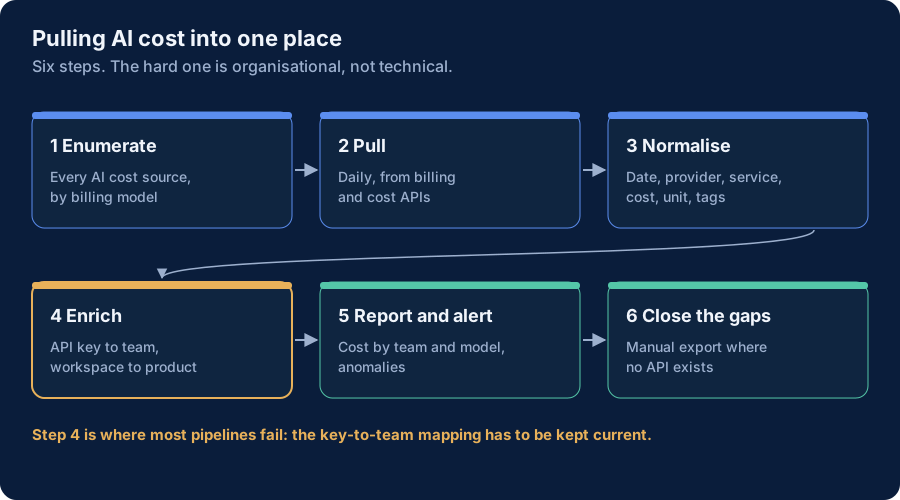
What this enables
A working AI billing pipeline enables the unit economics visibility that underpins sound AI cost governance. When cost data is available programmatically, at daily granularity, mapped to business context: Interpretation- Anomaly detection catches cost surprises within hours rather than at the end of the billing cycle
- Portfolio reviews can compare AI spend across initiatives on consistent, current data
- Stop or scale decisions can be made with actual cost evidence rather than estimates
- Chargeback and showback to business units become operational rather than ceremonial The billing API layer is not a substitute for the governance disciplines described in the AI TCO Framework and FinOps & AI pages - it is the technical foundation that makes those disciplines tractable at scale. Interpretation
References and further reading
Related reading
Framework for AI cost management including guidance on billing API integration and cost allocation patterns
Reference for programmatic access to AWS Bedrock and Amazon Q Developer costs through the GetCostAndUsage API
Current reference for OpenAI's Costs and Usage APIs for enterprise billing data access
Documentation for programmatic access to GitHub Copilot seat costs and usage metrics