

Key takeaways
- A benefits register tracks each benefit separately, with an owner, the record where it shows up, and an evidence level.
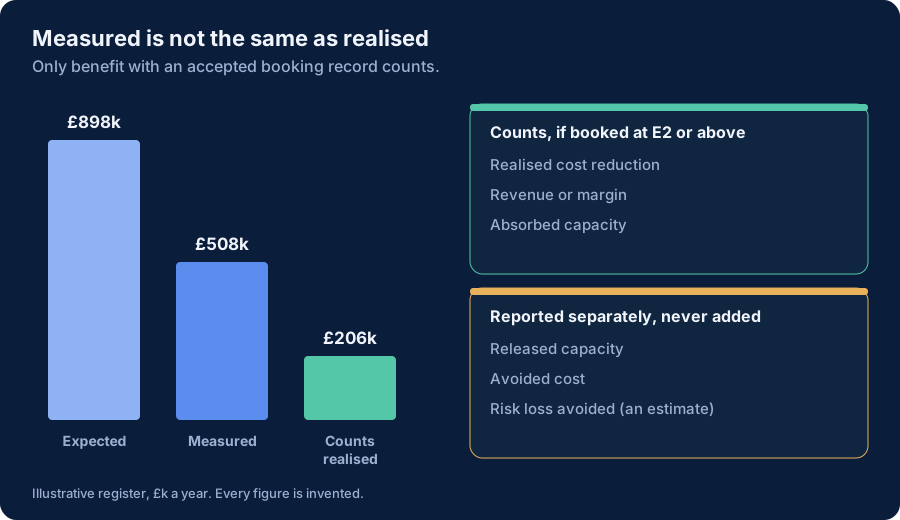
- The register's main rule is a classification. Released capacity, avoided cost and risk loss avoided are reported, but never added to realised value.
- It is a proposal, version 0.5, supplied as an Excel template.
The decision this helps make
How much of the value we claim for AI has actually reached the accounts? The ledger records value per workflow. The register lists the benefits themselves, which lets a finance team treat each one the way it would treat any other benefit: by type, owner and booking.
Best for: a finance partner or AI value lead who needs to defend the realised-value figure in a portfolio review or a board pack.
Not for: replacing a corporate benefits-realisation process. Use that if you have one, and use this to see what AI contributes to it.
Benefit types
| Type | Meaning | Counts as realised? |
|---|---|---|
| Realised cost reduction | Spend that has fallen, shown in a budget line or forecast | Yes, if booked and evidenced at E2 or above |
| Revenue or margin | Contribution that has appeared in the accounts | Yes, on the same conditions |
| Absorbed capacity | Freed time that has been turned into something booked, such as fewer contractor hours or more throughput | Yes, on the same conditions |
| Released capacity | Time freed but not yet turned into anything booked | No |
| Avoided cost | Spend that would have occurred and did not | No: reported separately |
| Risk loss avoided | Expected loss reduced | No: reported separately and labelled as an estimate |
The distinction between released and absorbed capacity does most of the work. Released time is real, but it is spread thinly and does not reduce cost unless someone changes a roster, a budget or a target.
What each row holds
A benefit description, the initiative it belongs to, the benefit type, a named owner, the expected annual value, the measured annual value, the budget line or record where it is booked, an evidence level, and a status. The workbook calculates the variance and whether the benefit counts as realised.
An illustrative register
The figures below are invented and describe no real organisation. They are the benefits behind the sample portfolio in the portfolio review pack. Money is in £ thousands a year.
| Benefit | Type | Expected | Measured | Booked in | Evidence | Counts as realised |
|---|---|---|---|---|---|---|
| Contract review: outside-counsel spend reduced | Realised cost reduction | 160 | 120 | Legal outside-counsel budget line | E3 | 120 |
| Contact-centre: agency and overtime hours reduced | Realised cost reduction | 240 | 60 | Contact-centre agency budget line | E2 | 60 |
| Coding assistant: contractor hours reduced | Absorbed capacity | 108 | 26 | Engineering contractor spend line | E2 | 26 |
| Workforce assistant: self-reported time saved | Released capacity | 300 | 0 | Not booked | E1 | 0 |
| Customer-service agent pilot: projected containment | Avoided cost | 90 | 0 | Not booked | E0 | 0 |
| Three rows of released time, not yet absorbed | Released capacity | 0 | 302 | Not booked | E2 to E3 | 0 |
What the summary shows: £898k expected, £206k realised (23%), and a further £302k of measured but unrealised released time. That is the same £206k realised in the portfolio and in the decision cases. The £302k is a to-do list, not a benefit: each pound needs a named way of becoming booked value, or it should stop being counted as one.
Using the workbook
The Excel workbook has a Benefits sheet (one row per benefit), a Summary sheet by benefit type, the evidence levels and a version sheet. Input cells are cream and formula cells are locked. Replace the blue illustrative rows.
Limitations
- The register depends on the booking record being named honestly. A made-up reference counts as realised. Finance should check the booking.
- It does not allocate a benefit that spans several initiatives. Decide the split before entering it, and enter it once.
- Attribution is not applied. If part of a measured benefit would have happened anyway, adjust the measured figure, as the ledger does with its attribution and persistence fields.
Status: Proposal, version 0.5. Hub proposals stay below 1.0 until they have survived outside challenge. A proposed operating artefact of this publication, not a standard. Change history: 0.5, 8 October 2026, first release.
Download: AI benefits register, version 0.5, 8 October 2026 (.xlsx). Sample data is invented.